KI-Agenten · MCP & A2A
Zwei Arten von Agenten fragen nach einem Haus. Es sind nicht dieselben Anrufer.
Der eine gehört Ihrem Gast. In einem Haus verbindet ein eingecheckter Gast sein eigenes Claude oder ChatGPT mit seiner Reservierung und fragt diesen Assistenten nach seinem Zimmer, seinem Plan, seinen Anfragen. Der andere gehört dem Fachvertrieb — der Assistent eines Reiseveranstalters, der einer DMC, der eines Travel Managers — und sucht für einen Kunden, der noch nichts gebucht hat. Verschiedene Anrufer, verschiedene Standards, und Aikebom beantwortet beide aus Ihren offiziellen Daten, mit Ihren Partnern offengelegt in der Antwort. Je eine Spur, unten.
Was ist MCP?
Das Model Context Protocol ist der aufstrebende offene Standard, um KI-Agenten mit Live-Daten und Tools zu verbinden — quasi „USB-C für KI“. Agenten sprechen es bereits. Ihr Haus oder Event über MCP verfügbar zu machen heißt: Sie bauen keine Integration pro Assistent — alle verbinden sich mit einem Endpunkt und entdecken, was sie fragen können.
Zwei Spuren
Für Ihre Gäste
Den eigenen Aufenthalt zur eigenen KI hinzufügen.
Im Haus: Ein eingecheckter Gast verbindet seinen eigenen Assistenten mit seiner Reservierung — sein Zimmer, seine Daten, sein Plan, der Stand seiner Anfragen. Der Link kommt beim Check-in von Ihnen.
Diese Spur lesen →Für den Fachvertrieb
Gefunden und direkt angesprochen werden.
Sobald Ihre eigene Domain verbunden ist, kann der Assistent eines Einkäufers Ihre Agentenkarte lesen und fragen, bevor jemand gebucht hat — Ihre Räume, Ihre Pakete, Ihre Partner. Öffentlich, ohne Schlüssel, bewusst werblich, und pro Haus mit Ihrem Tarif freigeschaltet.
Diese Spur lesen →Für Ihre Gäste
Den eigenen Aufenthalt zur eigenen KI hinzufügen.
In einem Haus kann ein eingecheckter Gast sein eigenes Claude oder ChatGPT mit seiner Reservierung verbinden. Die Zugangsdaten gehören ihm allein und erreichen ihn über Sie — zurückgegeben an Ihr PMS, sobald es den Check-in meldet, oder von einem Voll-Admin zur Buchung erzeugt — nie über ein Formular, das ein Gast auf einer Seite wie dieser ausfüllt. Es ist eine zweite Schranke auf dem Endpunkt unten, kein Ersatz für ihn, und beide werden pro Haus mit Ihrem Tarif freigeschaltet.
Sein Aufenthalt, verifiziert
Sein Zimmer — gelesen aus der Reservierung, die Ihr PMS gesendet hat, sodass ein Gast, der von 205 nach 318 umzieht, Antworten zu 318 bekommt, ohne es zweimal zu sagen — seine Daten, der Plan, den er gespeichert hat, und der Stand der Anfragen, die er gestellt hat. Sein eigener Assistent beantwortet „In welchem Zimmer bin ich?“ richtig, weil er Sie fragt.
Eine Anfrage, die Ihr Team bestätigt; eine Station im Plan des Gastes
Wo Schreibzugriff freigeschaltet ist, kann der Assistent eines Gastes handeln — auf zwei Arten, die nicht dasselbe sind. Ist Ihre Anfragen-Warteschlange aktiv, kann er eine Anfrage stellen: später auschecken, Housekeeping, eine Annehmlichkeit — protokolliert, auf dem Team-Bildschirm als „via guest’s AI“ zugeordnet und von Ihrem Team bestätigt, bevor irgendetwas passiert. Getrennt davon kann er eine Station zu dem Plan hinzufügen, den der Gast gespeichert hat; dieser Plan gehört dem Gast, die Station wird also direkt eingetragen und niemand aus Ihrem Team wird gefragt. Keine der beiden Aktionen bucht, belastet oder verspricht etwas.
Auf einen Gast, einen Aufenthalt begrenzt
Die Verbindung eines Gastes liest dessen eigene Reservierung und nie die eines anderen Gastes. Sie endet mit dem Aufenthalt, und eine Stornierung oder ein Check-out beendet sie, wo Ihr PMS das meldet. Alle Verbindungen Ihres Hauses auf einmal zu beenden — Gäste wie Integrationen — ist eine Plattform-Aktion, und sie wirkt überall nach etwa fünf Minuten.
Ihre offizielle Antwort, in seiner KI
Die Verbindung eines Gastes trägt neben seinem Aufenthalt auch Ihre öffentlichen Tools: Ihre Haus-Fakten und was läuft, die Stadt-Tools, die Sie freigegeben haben, und — wo Sie den Partner-Feed aktiviert haben — Ihre offiziellen Partner und Outlets, jeweils mit offengelegter Partnerschaft. Dieselben drei Ebenen, die Ihr Concierge im Chat und per Sprache nutzt: Was sein Assistent ihm sagt, ist Ihre Antwort und nicht die Vermutung einer Bewertungsseite.
In der eigenen KI eines Gastes
Ein Hotel, das in Claude antwortet.
Palazzo Vetra — unser fiktives Demonstrationshaus — als Live-MCP-Server verbunden im Claude eines Gastes: Haus-Fakten, Partner-Empfehlungen mit angehängter Offenlegung, getrackte Links. So sieht agent-ready aus Sicht des Gastes aus.
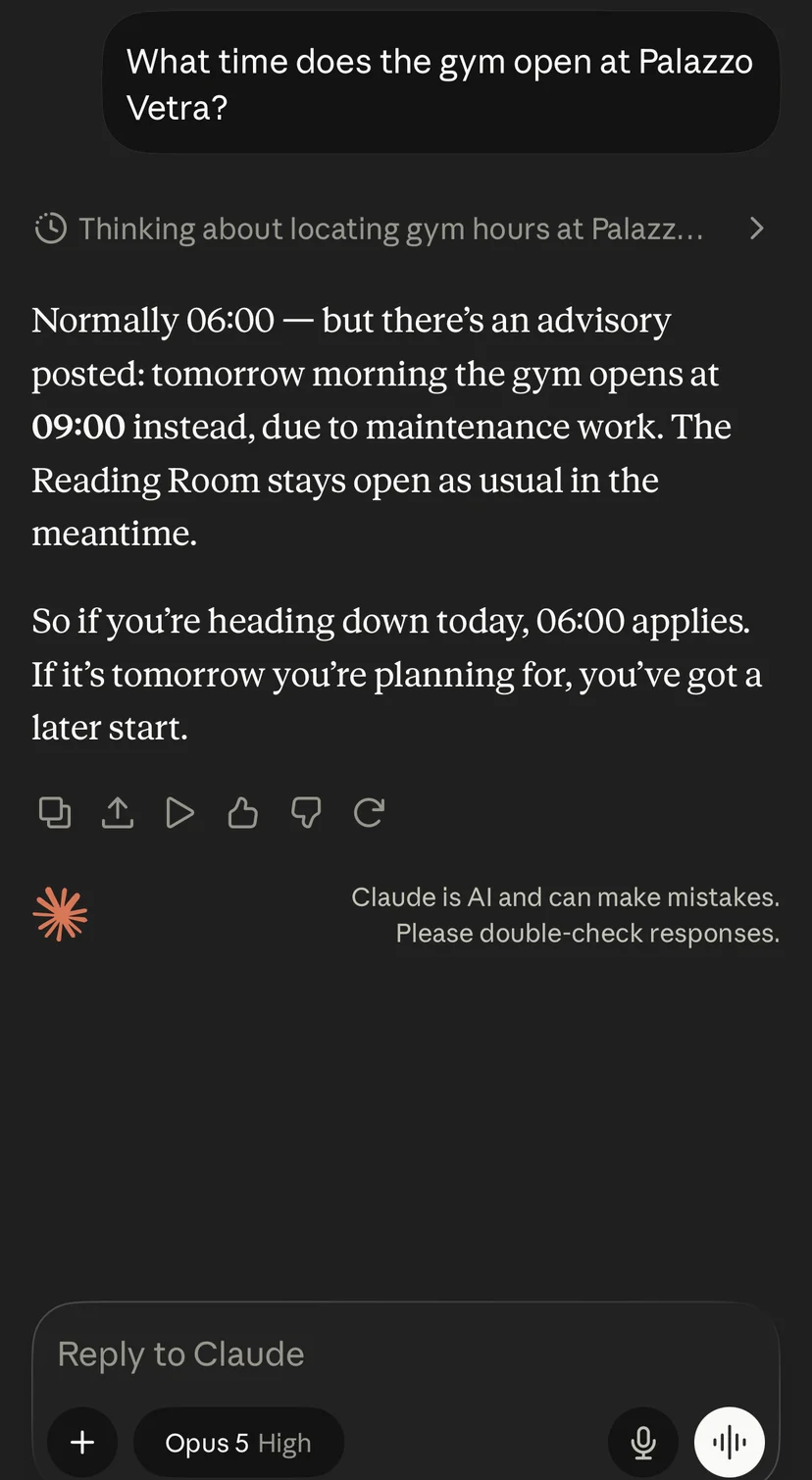
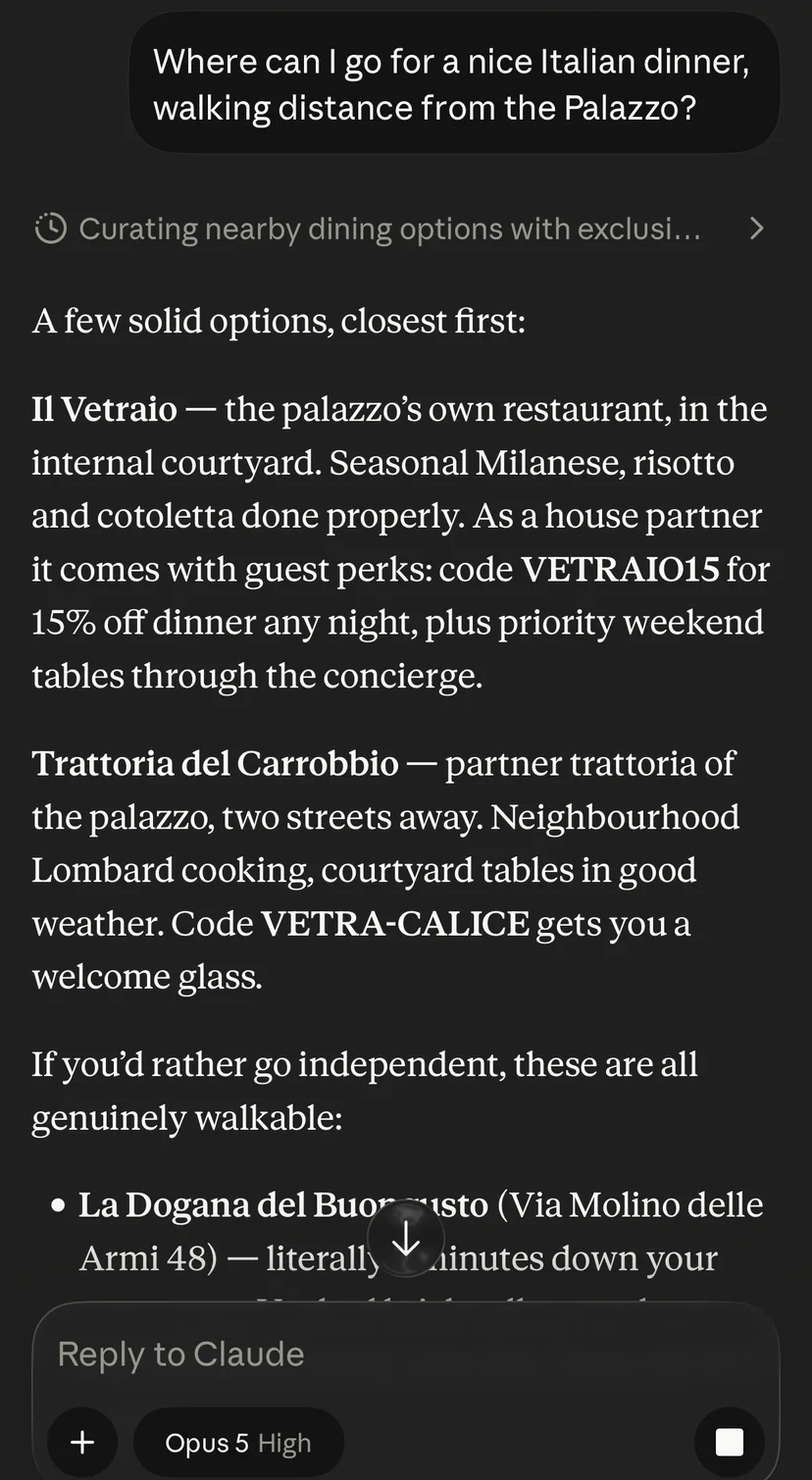
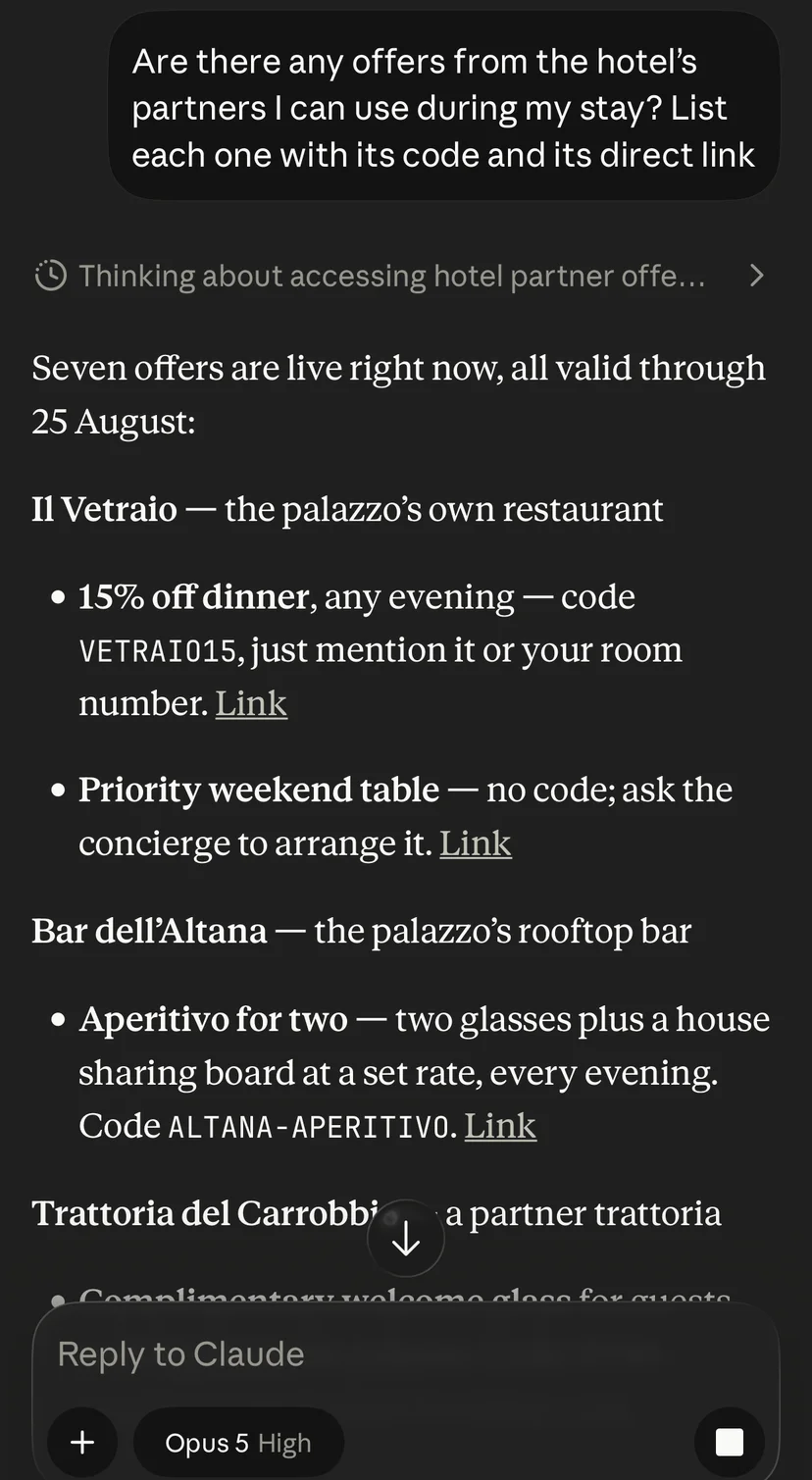
Palazzo Vetra ist ein fiktives Demonstrationshaus, betrieben von Aikebom.
Was Ihr Gast mit dem Link macht
Sie geben den Link weiter; der Gast fügt ihn einmal zu seinem Assistenten hinzu. Er trägt seinen Schlüssel und ist damit persönlich — bei der Übergabe ist der Hinweis sinnvoll, dass er wie ein Zimmerschlüssel funktioniert und nicht zum Weitergeben gedacht ist.
- In Claude öffnet der Gast claude.ai im Browser, geht zu Einstellungen → Konnektoren → „Eigenen Konnektor hinzufügen“, fügt den Link ein und bestätigt. Eigene Konnektoren lassen sich nicht in der Handy-App anlegen, werden danach aber dorthin synchronisiert.
- In ChatGPT aktiviert der Gast unter Einstellungen → Konnektoren den Entwicklermodus, legt einen Konnektor auf den Link an und schaltet ihn im Tools-Menü des Eingabefelds ein. Die Verfügbarkeit hängt von seinem ChatGPT-Abo ab.
- Jeder andere MCP-Client nimmt denselben Link unverändert. Der Schlüssel reist in der URL, weil die Konnektoren, die Gäste tatsächlich nutzen, keine Header senden können.
Für den Fachvertrieb
Gefunden und direkt angesprochen werden.
Auf dieser Spur fragt nicht Ihr Gast. Hier fragt der Fachvertrieb: der Assistent eines Reiseveranstalters, der einer DMC, der eines Travel Managers — oder der Agent von jemandem, der ein Spa-Hotel in Mailand mit einem Veranstaltungsraum für zwölf sucht. Zwei Türen bedienen ihn. Die offene ist A2A — der entstehende Standard von Agent zu Agent: Sobald Ihre eigene Domain verbunden ist, veröffentlicht Ihr Haus oder Event eine Agentenkarte unter einer festen Adresse auf dieser Domain, und jeder fremde Agent kann die Karte lesen und fragen, ganz ohne Schlüssel. Ein Marketingkanal, den ein Fremder nicht lesen kann, ist kein Marketingkanal. Die Karte ist standardmäßig deaktiviert und wird pro Haus mit Ihrem Tarif freigeschaltet, und alles darauf ist Material, das Sie veröffentlicht haben: keine Gästedaten, keine Buchungen, nichts, was Sie nicht selbst veröffentlicht haben. Die andere Tür ist der Endpunkt mit Schlüssel weiter unten — Ihre Informationen für Gäste und die öffentlichen Abfragen, die Sie zulassen, für die Partner und Integrationen, die Sie benennen.
Von Ihrem Marketing geschrieben
Ein Pack, das Sie selbst verfassen — für den Einkäufer, nicht für den Gast: Ihre Positionierung, Ihre Tagungs- und Veranstaltungsräume mit ihren Kapazitäten, die Zimmerkategorien, die laufenden Pakete, Ihre Auszeichnungen und wen man im Vertrieb und in der Presse anruft. Nicht gescrapt, nicht aus einer alten Broschüre abgeleitet — die Worte, die Sie gewählt haben, in der Sprache, die Sie gewählt haben, auf Anfrage beantwortet.
Ihre Partner reisen mit
Wenn Sie es aktivieren, trägt die Karte Ihre offiziellen Partner und Outlets sowie die aktuell gültigen Aktionen — jeweils mit offengelegter Geschäftsbeziehung und getracktem Link, damit eine Empfehlung, die im Agenten eines anderen beginnt, trotzdem in Ihrem Report landet. Abgelaufene Aktionen werden herausgefiltert: Ein maschinenlesbarer Feed hat niemanden, dem ein totes Datum auffällt.
Der Endpunkt mit Schlüssel, für Integrationen
Ihre Informationen für Gäste und die öffentlichen Abfragen, die Sie zulassen, über MCP, für einen Partner oder eine Integration statt für einen anonymen Anrufer — immer schreibgeschützt, standardmäßig verschlossen, und ein Schlüssel je Integration. Schlüssel erzeugt und widerruft Ihr Plattform-Admin — ein Widerruf beendet alle Schlüssel zugleich: Fragen Sie uns nach einem pro Integration. Sie kuratieren, welche Tools der Endpunkt bereitstellt — ein einziger Satz für den Schlüssel jeder Integration. Der Endpunkt spricht MCP über Streamable HTTP; claude.ai-Konnektoren nehmen den Schlüssel in der URL, andere Clients senden ihn als Bearer-Header.
Ein Index, den Agenten lesen können
Sobald Ihre eigene Domain verbunden ist, liefert Ihr Haus oder Event unter dieser Adresse einen KI-lesbaren Index unter /llms.txt — die Konvention, mit der Assistenten herausfinden, was ein Dienst beantworten kann, bevor sie sich verbinden. So findet ein Agent Sie überhaupt erst.
Sie sehen, wonach Agenten gefragt haben
Anfragen von Agenten werden in Ihrem Dashboard nach Tool und Fähigkeit gezählt — daneben, was Agenten wollten und nicht bekommen haben. Klicks, die über den Agentenkanal kommen, werden getrennt von Ihrem eigenen Traffic zugeordnet: neue Nachfrage, in einem Kanal, in dem es kaum Wettbewerb gibt.
https://aikebom.com/api/mcp?event=<your-event>&key=<token>claude mcp add --transport http your-event "https://aikebom.com/api/mcp?event=<your-event>" --header "Authorization: Bearer <token>"Eine Auswahl dessen, was eine Integration mit Schlüssel fragen kann
Was der Agent eines Einkäufers zurückbekommt
Wo Sie sind und was Sie sind, Ihre Räume und deren Kapazitäten, die laufenden Pakete mit ihren Gültigkeitsdaten, Ihre Auszeichnungen, Ihre Vertriebs- und Pressekontakte, Ihr Media-Kit — und Ihre Partner, mit offengelegter Partnerschaft. Schreibgeschützt, und pro Kunde freigeschaltet: Sie ist aus, bis Sie sie anfordern.
Zwei Grenzen, die wir offen benennen
Die Karte macht Sie ansprechbar: Ein Agent, der Ihre Adresse hat oder einem Link dorthin folgt, kann fragen. In den Verzeichnissen zu stehen, in denen Assistenten suchen, ist ein eigener Schritt — von Hand, mit Ihrer Zustimmung, niemals ein Schalter im Admin. Und die Karte ist bewusst werblich: Ihre Ankündigungen an Gäste und Ihr internes Programm werden dort nie ausgeliefert. Die folgen den Zugangsregeln Ihres eigenen Hauses, und ein öffentlicher Endpunkt ist nicht ihr Ort.
https://aikebom.com/.well-known/agent-card.jsonWir setzen sie zuerst bei uns selbst ein. Diese Adresse ist eine echte Karte für ein echtes Unternehmen — rufen Sie sie auf oder richten Sie einen A2A-Client darauf, und sie antwortet als Aikebom: was wir sind, was wir kosten, wie man uns erreicht.
Für Veranstalter und Hoteliers
Was Sie kuratieren — und was mit Ihrem Tarif kommt.
Sie kuratieren, welche Tools der Endpunkt bereitstellt, Sie aktivieren den Partner-Feed, und Sie verfassen das Marketing-Pack selbst. Der Endpunkt, die Verbindungen Ihrer Gäste und die Agentenkarte werden pro Haus mit Ihrem Tarif freigeschaltet, und Schlüssel für Integrationen erzeugt Ihr Plattform-Admin und widerruft sie nur alle zusammen — fragen Sie uns nach einem pro Integration. So oder so sind es dieselben Inhalte, auf die sich Ihr Concierge ohnehin stützt: keine neuen Daten zu pflegen.
Der Pitch in einer Zeile
Ihr Haus kann eine Live-Quelle sein, mit der die eigene KI Ihrer Gäste einfach spricht — kein PDF und keine App, die man erst öffnen muss — mit Ihren Partnern fest in der Antwort verankert.
Probieren Sie es an uns aus
Verbinden Sie Ihren eigenen Agenten mit genau dieser Website.
Bevor Sie uns beim Wort nehmen, richten Sie Ihre eigene KI auf uns. Wir betreiben dieselbe Idee auf aikebom.com: einen schreibgeschützten Live-MCP-Endpunkt, den Ihr Agent jetzt sofort abfragen kann — was Aikebom ist, wie es funktioniert, Preise, FAQ, unsere Fallstudie und wie Sie uns erreichen — ohne dass ein Mensch die Website lesen muss. Genau das erleben Ihre Teilnehmer, nur auf Ihr Event gerichtet.
https://aikebom.com/api/site-mcpclaude mcp add --transport http aikebom https://aikebom.com/api/site-mcp
Scannen, um die URL an einen Agenten auf Ihrem Handy zu übergeben.
Beweis, keine Versprechen
Sehen Sie zu, wie ein Agent diese Website abfragt — jetzt gleich.
Dieser Button lässt Ihren Browser genau das tun, was ein KI-Assistent tut: unseren Live-Endpunkt aufrufen, seine Tools auflisten und einem davon eine Frage stellen. Echter Endpunkt, echte Antwort, nichts inszeniert.
›Wie verbinde ich das mit meinem Assistenten?
Es ist ein standardmäßiger Remote-MCP-Endpunkt — jeder MCP-fähige Assistent kann ihn lesen. Die gängigsten:
Claude (auch die iPhone/Android-App)
- Eigene Konnektoren lassen sich nicht in der Mobil-App hinzufügen — fügen Sie ihn einmal auf claude.ai im Browser hinzu, und er synchronisiert sich automatisch aufs Handy.
- Auf claude.ai: Einstellungen → Konnektoren → „Eigenen Konnektor hinzufügen“, die Endpunkt-URL einfügen, dann „Hinzufügen“. Keine Authentifizierung nötig — er ist öffentlich und schreibgeschützt, die erweiterten Einstellungen bleiben also leer.
- In der Claude-App (iPhone/Android): Chat öffnen, auf „+“ tippen, „Aikebom“ aktivieren und fragen: „Was ist Aikebom, und was kostet es?“
- Funktioniert mit den Plänen Free, Pro, Max, Team und Enterprise.
ChatGPT
- Einstellungen → Konnektoren → Entwicklermodus aktivieren, dann einen Konnektor mit der Endpunkt-URL hinzufügen. Im Tools-Menü des Eingabefelds einschalten. (Die Verfügbarkeit hängt von Ihrem ChatGPT-Plan ab.)
Gemini
- Remote-MCP wird über die Gemini-API/SDK und die Gemini-CLI (Streamable HTTP) unterstützt, nicht über die Verbraucher-App — richten Sie Ihren Client auf die Endpunkt-URL.
Jeder MCP-Client / Claude Code / IDEs
- Ausführen: claude mcp add --transport http aikebom https://aikebom.com/api/site-mcp
Gehostete Assistenten wie Claude verbinden sich aus ihrer eigenen Cloud mit dem Endpunkt — er muss also nur im öffentlichen Web erreichbar sein. Und das ist er, sobald das auf aikebom.com live ist.
Was er über uns beantworten kann
Machen Sie Ihr Haus agent-ready.
Buchen Sie eine Demo und wir verbinden vor Ihren Augen einen echten Endpunkt mit einem Agenten — und zeigen den Partner-Feed.
- Kein Engineering auf Ihrer Seite
- Live in Wochen
- Ohne Konten & DSGVO von Grund auf