AI agents · MCP & A2A
Two kinds of agent ask about a property. They are not the same caller.
One belongs to your guest. At a property, a checked-in guest connects their own Claude or ChatGPT to their reservation and asks that assistant about their room, their plan, their requests. The other belongs to the trade — the assistant of a travel organiser, of a DMC, of a corporate booker — shopping for a client who has not booked anything yet. Different callers, different standards, and Aikebom answers both from your official data with your partners disclosed in the answer. One lane each, below.
What’s MCP?
The Model Context Protocol is the emerging open standard for connecting AI agents to live data and tools — think “USB-C for AI”. Agents already speak it. Exposing your property or event over MCP means you don’t build an integration for each assistant: they connect to one endpoint and discover what they can ask.
Two lanes
For your guests
Add your stay to your own AI.
At a property: a checked-in guest links their own assistant to their reservation — their room, their dates, their plan, the status of their requests. The link comes from you at check-in.
Read this lane →For the trade
Be found and addressed by agents.
Once your own domain is connected, a buyer’s assistant can read your agent card and ask before anyone has booked — your spaces, your packages, your partners. Public, keyless, promotional by design, and switched on per property with your plan.
Read this lane →For your guests
Add your stay to your own AI.
At a property, a checked-in guest can link their own Claude or ChatGPT to their reservation. The credential is theirs alone and it reaches them through you — handed back to your PMS when it reports the check-in, or minted by a full admin against the booking — never a form a guest fills in on a page like this one. It is a second gate on top of the endpoint below, not a replacement for it, and both are switched on per property with your plan.
Their stay, verified
Their room — read from the reservation your PMS pushed, so a guest moved from 205 to 318 gets answers about 318 without telling anyone twice — their dates, the plan they’ve saved, and the status of the requests they’ve raised. Their own assistant answers “which room am I in?” correctly, because it is asking you.
A request your staff confirm; a stop on the guest’s own plan
Where writing is switched on, a guest’s assistant can act — in two ways that are not the same. With your staff-request queue enabled it can raise a request: a late checkout, housekeeping, an amenity — logged, attributed “via guest’s AI” on the staff screen, and confirmed by your team before anything happens. Separately, it can add a stop to the plan the guest has saved; that plan is the guest’s own, so the stop is added straight to it and no one on your team is asked. Neither action books, charges nor promises anything.
Scoped to one guest, one stay
A guest’s connection reads that guest’s own reservation and no other guest’s, ever. It expires with the stay, and where your PMS reports it, a cancellation or a check-out ends it. Ending every connection at your property at once — guests and integrations alike — is a platform action, and it takes effect everywhere in about five minutes.
Your official answer, inside their AI
A guest’s connection carries your public tools as well as their stay: your house facts and what’s on, whichever city tools you have exposed, and — where you have opted into the partner feed — your official partners and outlets, each with the partnership disclosed. The same three layers your concierge uses in chat and by voice, so what their assistant tells them is your answer and not a review site’s guess.
Inside a guest’s own AI
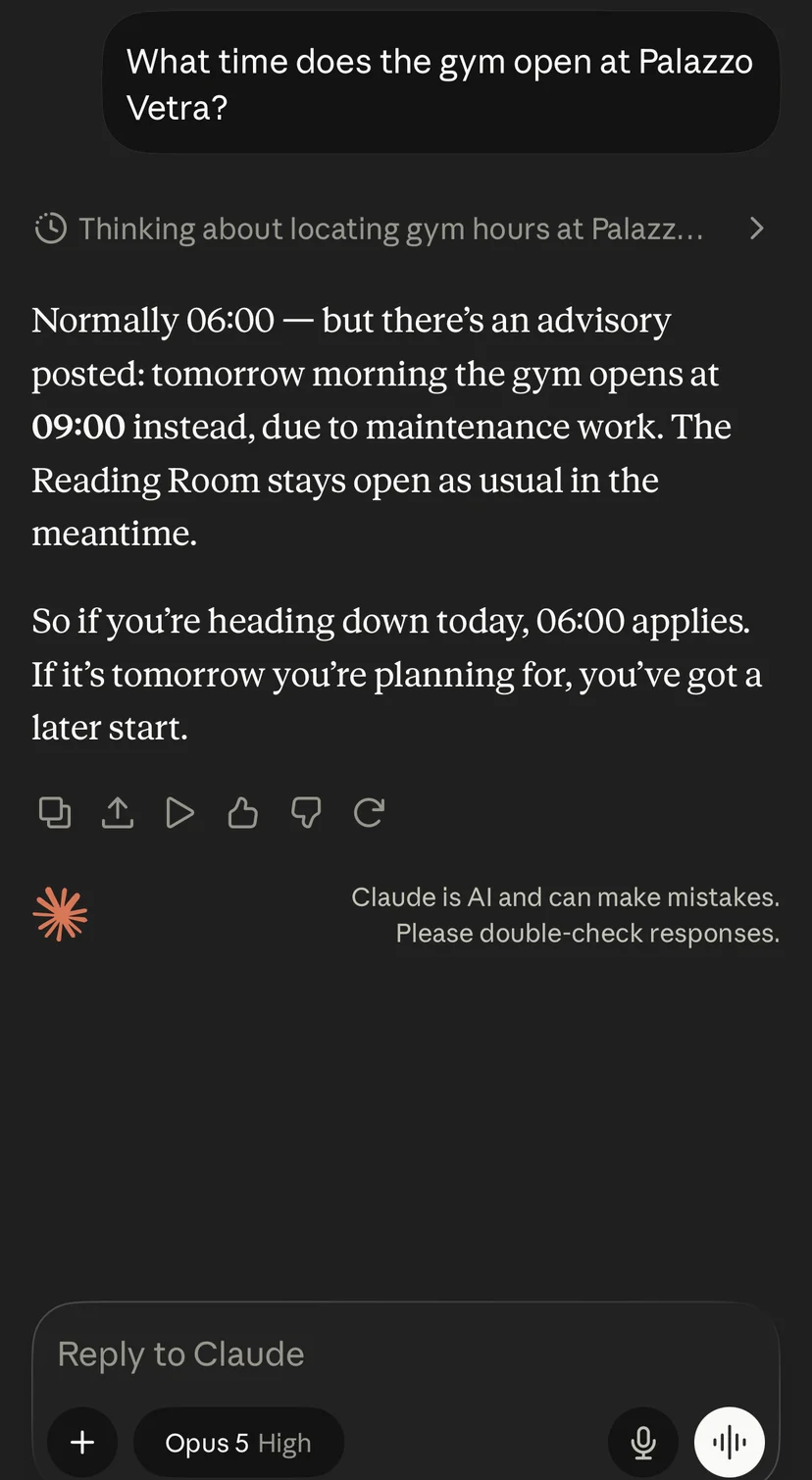
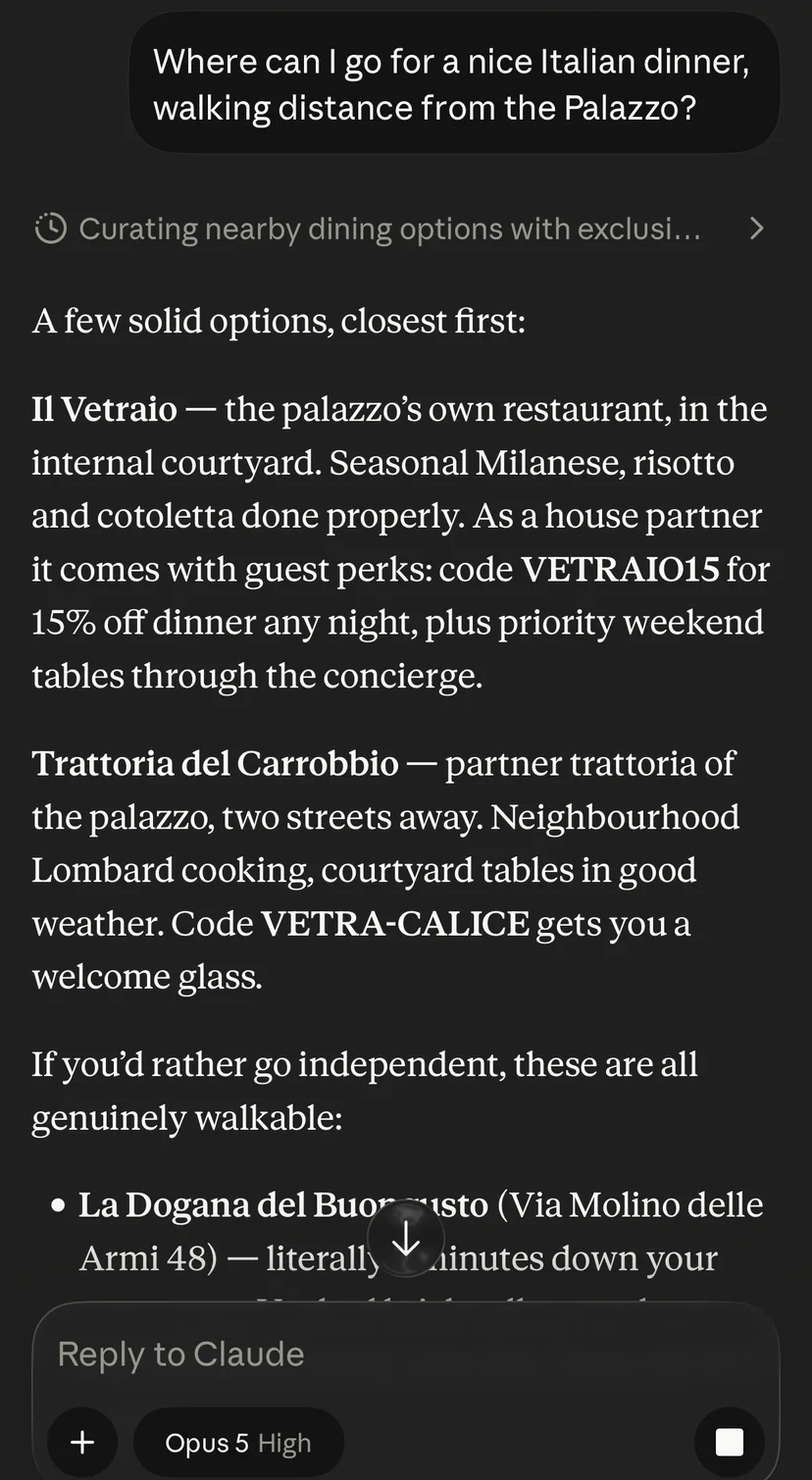
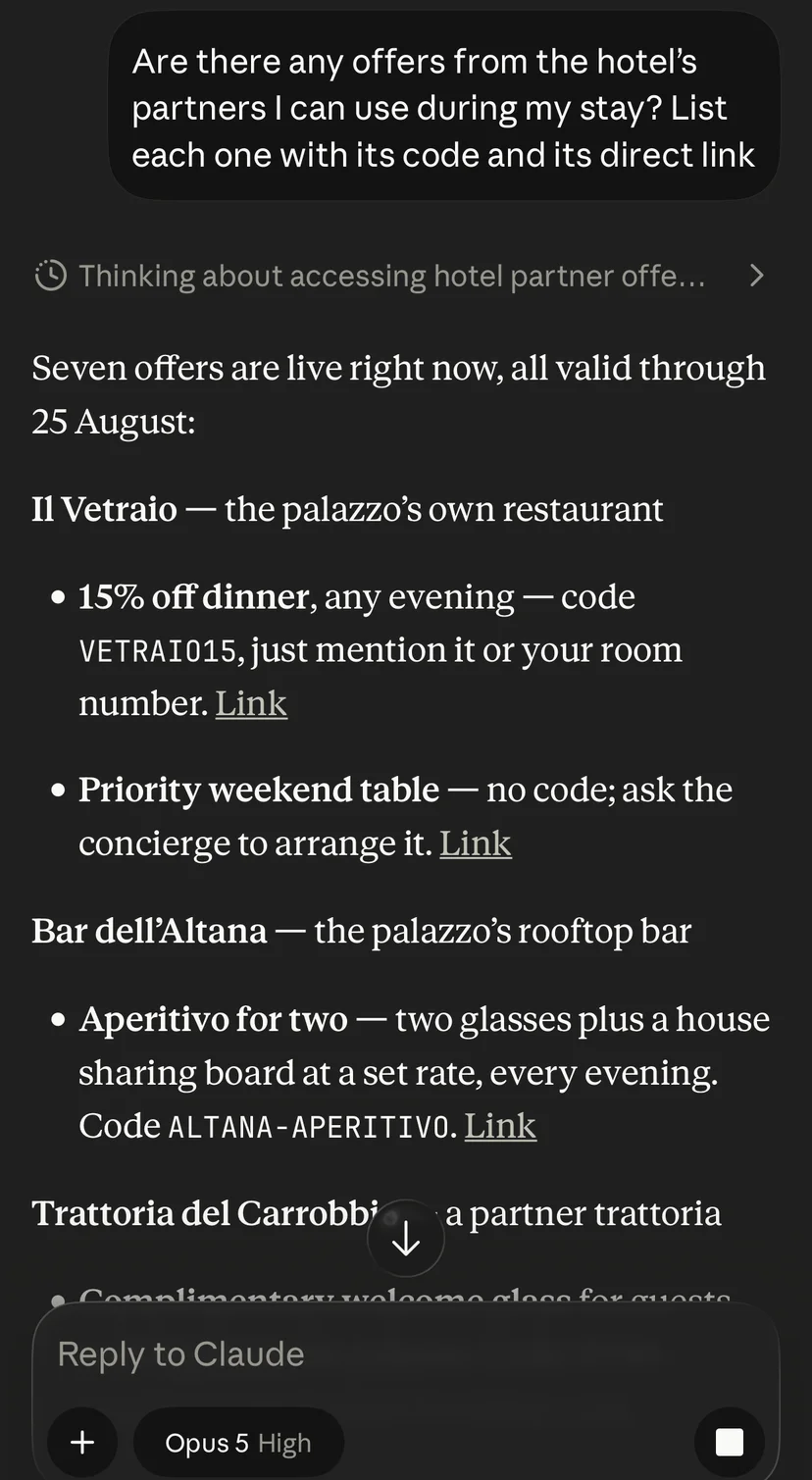
A hotel, answering inside Claude.
Palazzo Vetra — our fictional demonstration property — connected as a live MCP server inside a guest’s Claude: property facts, partner recommendations with the disclosure attached, tracked links. This is what agent-ready looks like from the guest’s side.
Palazzo Vetra is a fictional demonstration property operated by Aikebom.
What your guest does with the link
You pass the link on; the guest adds it to their assistant once. It carries their key, so it is personal to them — worth saying, when you hand it over, that it works like a room key and is not for sharing.
- In Claude, the guest opens claude.ai in a browser, goes to Settings → Connectors → “Add custom connector”, pastes the link and adds it. Custom connectors cannot be added from the phone app, but they sync to it once added.
- In ChatGPT, the guest enables Developer mode under Settings → Connectors, adds a connector pointing at the link, then turns it on from the composer’s tools menu. Availability depends on their ChatGPT subscription.
- Any other MCP client takes the same link unchanged. The key travels on the URL because the connectors guests actually use cannot send headers.
For the trade
Be found and addressed by agents.
The caller in this lane isn’t your guest. It’s the trade: a travel organiser’s assistant, a DMC’s, a corporate booker’s, or a shopper’s agent hunting a spa hotel in Milan with a meeting room for twelve. Two doors serve them. The open one is A2A — the emerging agent-to-agent standard: once your own domain is connected, your property or event publishes an agent card at a fixed address on that domain, and any peer agent can read the card and ask, with no key at all. A marketing channel a stranger can’t read isn’t a marketing channel. The card is off by default and switched on per property with your plan, and everything on it is material you published: no guest data, no bookings, nothing you have not published yourself. The other door is the keyed endpoint below — your guest-facing information and the public lookups you allow, for the partners and integrations you name.
Written by your marketing team
A pack you author, for the buyer rather than the guest: your positioning, your meeting and function spaces with their capacities, room types, the packages currently running, your accolades, and who to call in sales and press. Not scraped, not inferred from an old brochure — the words you chose, in the language you chose, answered on request.
Your partners travel with it
Opt in and the card carries your official partners and outlets, and the promotions currently valid — each with its commercial relationship disclosed and its link tracked, so a referral that begins inside somebody else’s agent still lands in your report. Lapsed promotions are filtered out: a machine feed has no reader to notice a dead date.
The keyed endpoint, for integrations
Your guest-facing information and the public lookups you allow, over MCP, for a partner or an integration rather than an anonymous caller — read-only always, closed by default, and one key per integration. Keys are minted and revoked by your platform admin — one revocation ends them all: ask us for one per integration. You curate which tools the endpoint exposes — one set, for every integration’s key. The endpoint speaks MCP over Streamable HTTP; claude.ai connectors take the key on the URL, and other clients send it as a bearer header.
An index agents can read
Once your own domain is connected, your property or event serves an AI-readable index at /llms.txt on that address — the convention assistants use to discover what a service can answer before they connect. It’s how an agent finds you at all.
You see what agents came asking for
Agent queries are counted in your dashboard by tool and skill, next to what agents asked for and couldn’t get. Clicks arriving through the agent channel are attributed separately from your own traffic — new demand, in a channel that barely has competition yet.
https://aikebom.com/api/mcp?event=<your-event>&key=<token>claude mcp add --transport http your-event "https://aikebom.com/api/mcp?event=<your-event>" --header "Authorization: Bearer <token>"A sample of what an integration with a key can ask
What a buyer’s agent gets back
Where you are and what you are, your spaces and their capacities, your current packages with their validity dates, your accolades, your sales and press contacts, your media kit — and your partners, disclosure attached. Read-only, and switched on per client: it is off until you ask for it.
Two honest limits
The card makes you addressable: an agent that has your address, or follows a link to it, can ask. Getting listed in the directories where assistants go looking is a separate step — by hand, with your consent, never a switch in an admin panel. And the card is promotional by design: your guest-facing announcements and your internal programme are never served on it. Those follow your property’s own access rules, and a public endpoint is not where they belong.
https://aikebom.com/.well-known/agent-card.jsonWe run one on ourselves first. That address is a real card for a real business — fetch it, or point an A2A client at it, and it answers as Aikebom: what we are, what we cost, how to reach us.
For organisers & hoteliers
What you curate, and what comes with your plan.
You curate which tools the endpoint exposes, you opt into the partner feed, and you write the marketing pack yourself. The endpoint, your guests’ connections and the agent card are switched on per property with your plan, and integration keys are minted by your platform admin, and revoked only all together — ask us for one per integration. Either way it’s the same content your concierge already grounds on: no new data to maintain.
The pitch in one line
Your property can be a live source your guests’ own AI simply talks to — not a PDF and an app they have to open — with your partners built into the answer.
Try it on us
Connect your own agent to this very site.
Before you take our word for it, point your own AI at us. We run the same idea on aikebom.com: a live, read-only MCP endpoint your agent can query right now for what Aikebom is, how it works, pricing, FAQ, our case study, and how to get in touch — no human reading the site required. That’s exactly the experience your attendees get, pointed at your event instead.
https://aikebom.com/api/site-mcpclaude mcp add --transport http aikebom https://aikebom.com/api/site-mcp
Scan to hand the URL to an agent on your phone.
Proof, not promises
Watch an agent query this site — right now.
This button makes your browser do exactly what an AI assistant does: call our live endpoint, list its tools, and ask one of them a question. Real endpoint, real response, nothing staged.
›How do I connect it to my assistant?
It’s a standard remote MCP endpoint, so any MCP-capable assistant can read it. The common ones:
Claude (including the iPhone/Android app)
- Custom connectors can’t be added from the mobile app — add it once at claude.ai in a browser, and it syncs to your phone automatically.
- On claude.ai: Settings → Connectors → “Add custom connector”, paste the endpoint URL, then “Add”. No authentication needed — it’s public and read-only, so leave Advanced settings empty.
- In the Claude app (iPhone/Android): open a chat, tap “+”, turn on “Aikebom”, and ask “What is Aikebom, and what does it cost?”
- Works on the Free, Pro, Max, Team and Enterprise plans.
ChatGPT
- Settings → Connectors → enable Developer mode, then add a connector pointing at the endpoint URL. Turn it on from the composer’s tools menu. (Availability depends on your ChatGPT plan.)
Gemini
- Remote MCP is supported through the Gemini API/SDK and the Gemini CLI (Streamable HTTP) rather than the consumer app — point your client at the endpoint URL.
Any MCP client / Claude Code / IDEs
- Run: claude mcp add --transport http aikebom https://aikebom.com/api/site-mcp
Hosted assistants like Claude connect to the endpoint from their own cloud, so it only needs to be reachable on the public web — which it is once this is live on aikebom.com.
What it can answer about us
Make your property agent-ready.
Book a demo and we’ll connect a live endpoint to an agent in front of you — and show the partner feed.
- No engineering on your side
- Live in weeks
- No accounts & GDPR-by-design